
Dashboards are the backbone of business intelligence.
Whenever a business wants to grow faster, track revenue, monitor users, manage teams, or make better decisions, one thing becomes important very quickly: “Dashboards”
Today, dashboards are not just admin panels with charts.
They are used for:
- SaaS platforms
- AI tools
- CRM software
- eCommerce systems
- Banking apps
- Internal company tools
- Analytics platforms
For developers, dashboards are part of daily work.
Sometimes you need to build:
- Internal HR tools
- Analytics systems
- Multi-tenant SaaS products
- AI admin panels
- Reporting platforms
- Customer management systems
And honestly, nobody wants to build everything from zero every single time.
That is why modern dashboard templates became so important in 2026.
What Makes a Dashboard “Modern” in 2026 ?
In 2026, a modern dashboard is not only about design.
Frontend developers now expect:
- Latest framework support
- Ready-to-use authentication
- Copy-paste components
- AI-ready workflows
- Fast setup process
- Better folder structure
- Reusable UI blocks
- Charts and tables
- Theme customization
- Production-ready architecture
Most developers now prefer dashboards built with:
- Latest React
- Next.js
- Vue
- Tailwind CSS
- TypeScript
- shadcn/ui
- Material UI
- Tanstack
- Firebase
- NextAuth
Earlier developers used dashboards only for UI.
Now Web developers check:
- Architecture quality
- Authentication system
- Table performance
- AI integrations
- Folder structure
- Reusable components
- Scalability
- Update frequency
We tested all these dashboard templates based on:
- Developer experience
- Framework support
- UI ecosystem
- AI WorkFlow
- Scalability
- Performance
- Documentation quality
- Real production usage
- Live Support
This guide breaks down six production-grade dashboard templates popular in 2026, comparing their framework support, component libraries, update frequency, and ideal use cases. Just framework compatibility and which one to pick for your next dashboard project.
Best Modern Dashboard Templates in 2026
| Dashboard | Best For | Frameworks |
| Modernize | Multi-framework SaaS dashboards | React, Next.js, Vue, Tailwind, Shadcn, Bootstrap, MUI |
| MaterialM | Material Design + AI tools | Angular, React, Vue, Next.js, Vue, Tailwind, Shadcn, Bootstrap, Nuxt |
| Shadcn Space | AI-ready Next.js dashboards | Shadcn UI, Next.js, Tailwind, TypeScript |
| Tailwindadmin | Lightweight startup dashboards | Shadcn, React, Vue, Angular, Next.js, Tailwind |
| Untitled UI | Design systems and analytics | React, Figma |
| DashNext | Next.js SaaS admin panels | Next.js, Tailwind |
Modernize Dashboard
It focuses on modern frontend development instead of limiting developers to one framework only. One of the biggest reasons developers like it is because it supports multiple frontend ecosystems together.
Modernize works exactly like its name.
Instead of rebuilding the same dashboard again and again, teams can use the same UI system across projects.

Best For: SaaS dashboards, enterprise admin panels, CRM systems, analytics platforms, internal company tools.
Key Features
- Vite.js support for faster builds
- TypeScript architecture
- SSR-ready structure
- Dark and light mode
- RTL support
- Live theme customization
- ApexCharts integration
- CRM and eCommerce apps included
- Invoice and Kanban pages
- CRUD operations
- Search and advanced filters
- Role-based authentication
- i18n multilingual support
- Inbuilt NextAuth
Dashboard Examples
- Analytics dashboard
- CRM dashboard
- eCommerce dashboard
- Kanban board
- Invoice management
- Chat applications
Frameworks Available In:
- Modernize React
- Modernize Next.js
- Modernize Vuejs
- Modernize Tailwind CSS
- Modernize Bootstrap 5
- Modernize Material UI
- Modernize Figma
Last Updated: 6th May 2026
MaterialM Dashboard
MaterialM is more focused on developer productivity and Material Design.
It is useful for teams building AI tools and enterprise dashboards & applications.
What makes this dashboard different is the built-in AI prompt system. Developers can use pre-built prompts directly inside the dashboard workflow which saves time during development.

Best For: AI dashboards, enterprise reporting systems, Material UI projects, admin panels, data-heavy applications.
Key Features
- 100+ UI components
- 3400+ font icons
- Material Design layouts
- Authentication pages included
- 690+ page templates in Pro version
- Multiple dashboard layouts
- ApexCharts support
- Data tables and calendars
- Chat and invoice applications
- Dark and light mode
- Modular code structure
- AI prompt discovery pages
- Reusable AI workflows
- Faster development process
- Inbuilt NextAuth
Dashboard Examples
- Sales dashboard
- Analytics dashboard
- CRM system
- Invoice dashboard
- AI Prompt Library
- User management pages
Frameworks Available In:
- MaterialM React + Tailwind CSS
- MaterialM Next.js + Tailwind CSS
- MaterialM Vue
- MaterialM Vuetify
- MaterialM Bootstrap
- MaterialM Nuxt
- MaterialM Angular
- MaterialM Shadcn
Last Updated: 12th May 2026
Shadcn Dashboard by Shadcn Space
Shadcn dashboards changed how developers build admin panels in 2026.
Instead of using heavy UI systems, developers now prefer copy-paste components that work naturally with Next.js and Tailwind CSS.
This shadcn/ui dashboard feels more like a production-ready frontend UI Kit with AI Tools like “Shadcn AI Form Builder“ instead of a normal template.
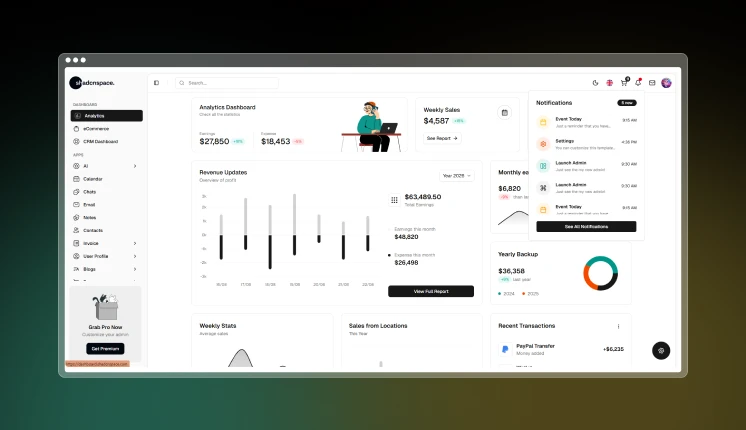
Best For: AI SaaS products, enterprise dashboards, Next.js applications, multi-tenant systems, shadcn/ui projects.
Key Features
- 323+ UI Blocks
- 241+ reusable UI components
- 14+ applications included
- AI-powered prompts
- Context-aware AI workflows
- NextAuth, Supabase, and Firebase authentication
- TanStack Table integration
- Zod form validation
- Drag-and-drop support
- Tiptap editor support
- Framer Motion animations
- RTL layouts
- Dark mode
- Multiple sidebar layouts
- Unlimited color customization
- next-intl i18n support
- Enterprise-ready architecture
- Faster copy-paste workflow
Dashboard Examples
- Main dashboard
- Dark dashboard
- Horizontal dashboard
- RTL dashboard
- Mini sidebar dashboard
- AI applications
- eCommerce dashboard
- Analytics dashboard
Last Updated: 12th May 2026
Frameworks Available In:
TailwindAdmin
TailwindAdmin is focused on simple development workflows.
Some developers do not need huge enterprise dashboard with hundreds of pages. They just need a clean Tailwind dashboard with reusable components and faster setup with AI Tools.
That is where Tailwindadmin Dashboard works really well.
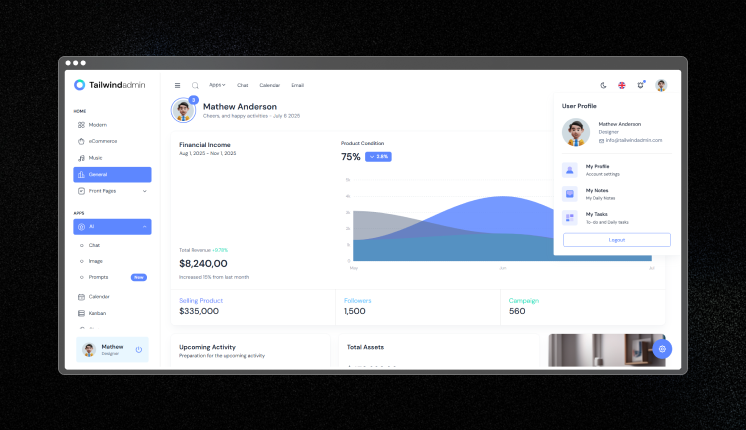
Best For: Startup dashboards, MVP products, lightweight admin panels, internal reporting tools.
Key Features
- Lightweight architecture
- Tailwind-first UI system
- Faster setup process
- Reusable dashboard layouts
- Analytics widgets
- Modern table systems
- Easy customization
- Cleaner utility-class workflow
- Developer-friendly structure
- Inbuilt NextAuth
Dashboard Examples
- Startup analytics dashboard
- Admin reporting system
- Team management dashboard
- User analytics pages
- Product overview panels
Frameworks Available In:
- Tailwindadmin React
- Tailwindadmin Next.js
- Tailwindadmin Vue
- Tailwindadmin Tanstack
- Tailwindadmin Angular
- Tailwindadmin Shadcn
- Tailwindadmin Figma
Last Updated: 14th May 2026
Untitled UI
Untitled UI still remains popular in 2026 because of its design system quality.
It focuses more on structured UI systems instead of heavy admin features.
Many frontend teams use it as a base for dashboards and SaaS products because the spacing, layouts, and component structure feel consistent.
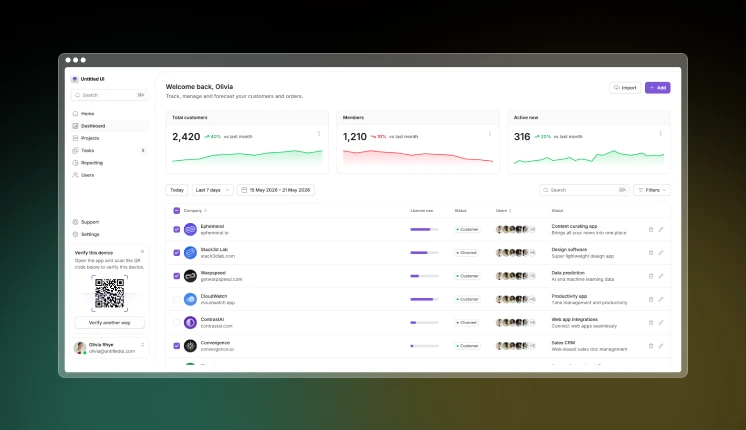
Best For: Product design systems, fintech apps, analytics dashboards, React + Figma workflows.
Key Features
- 60+ page examples
- Analytics layouts
- CRM pages
- Dashboard systems
- KPI chart layouts
- Activity feeds
- Auto Layout 5.0 support
- Variables and component properties
- 940+ button variants
- 188+ input variants
- Modals and alerts
- 4px grid system
- Dark mode design support
- Reusable design tokens
Dashboard Examples
- Banking dashboard
- Fintech dashboard
- Website analytics
- Sales overview
- Site traffic dashboard
- Customer dashboard
- Organization overview
Frameworks Available In:
Last Updated: 21th Nov 2025
DashNext
Instead of supporting too many ecosystems, it stays focused on Next.js, React, Tailwind CSS, and Flowbite, Figma which keeps the structure cleaner and easier for Modern teams.
DashNext focuses mainly on Next.js dashboards development.
It is useful for developers who want a faster setup without complicated architecture.
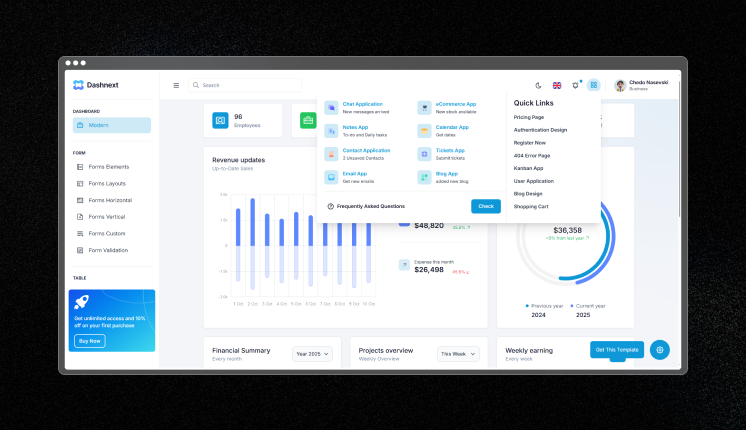
Best For: Next.js SaaS apps, startup dashboards, authentication-heavy applications, analytics tools.
Key Features:
- Built with React 19
- Next.js App Router support
- Dynamic tables
- Analytics widgets
- Reusable UI components
- Built-in NextAuth support
- Organized folder structure
- Faster onboarding process
- Tailwind CSS styling
- Easier customization
- Flowbite integration
Dashboard Examples:
- HR admin panel
- CRM Dashboard
- User analytics dashboard
- Authentication system
- Reporting dashboard
- Payroll management panel
Frameworks Available In:
Last Updated: 12th May 2026
What Developers Check Before Choosing a Dashboard
Today developers do not choose dashboards only based on UI.
They usually check:
- Framework compatibility
- Authentication support
- Table performance
- AI workflow support
- Scalability
- Documentation
- Folder structure
- Reusable components
Modern dashboards are now becoming full frontend systems instead of just admin templates.
Which Modern Dashboard Should You Choose ?
| Use Case | Recommended Dashboard |
| Multi-framework projects | Modernize |
| AI-powered admin tools | Shadcn Dashboard |
| Material Design ecosystem | MaterialM |
| Lightweight startup projects | TailwindAdmin |
| Design systems | Untitled UI |
| Next.js SaaS applications | DashNext |
Looking for more dashboard inspiration after this article?
Browse our “Best Dashboard Designs“ blog for admin panels, analytics tools, CRM systems, and SaaS platforms.
FAQ’s
Can I mix components from multiple dashboard templates?
Technically: Yes. All use React/Vue and can coexist in one project.
Practically: Painful. Each template has its own:
- Design token system (CSS variables, Tailwind config)
- Component API patterns
- State management conventions
- Theming approach
Better approach:
- Choose one template as the base
- Extract specific components from others
- Adapt to match base template’s patterns
Which framework is Best for Modern admin dashboards?
React and Next.js are currently the most popular choices because of:
- Better component ecosystem
- SSR support
- TypeScript support
- AI tooling integrations
- Large community support
Vue is also popular for lightweight admin systems.
How do you design a responsive dashboard?
Most modern dashboards use:
- CSS Grid
- Flexbox layouts
- Adaptive sidebars
- Dynamic tables
- Responsive chart containers
- Tailwind CSS utility classes
- Using Shadcn UI based components
How do modern dashboards handle large datasets?
Most dashboards handle large datasets using:
- SWR
- React Query
- Virtualized tables
- Server-side pagination
- Infinite scrolling
- Memoized rendering
- Edge caching
TanStack Table is commonly used for handling scalable data tables.
Final Thoughts
Modern dashboards in 2026 are not just UI kits anymore.
They help developers:
- Build products faster
- Scale frontend systems
- Add AI workflows
- Reuse components
- Reduce setup time
- Improve development speed
The right dashboard template can save weeks of frontend work and make scaling much easier for development teams.
Leave a Reply